What runs after the build.
What runs in the background, chat, what a new store comes with, AI pictures, A/B tests, search, analytics and the services Pastefront works with.
The two screens you'll use most.
Real screens from Pastefront, showing a sample store with sample orders.
Store Home
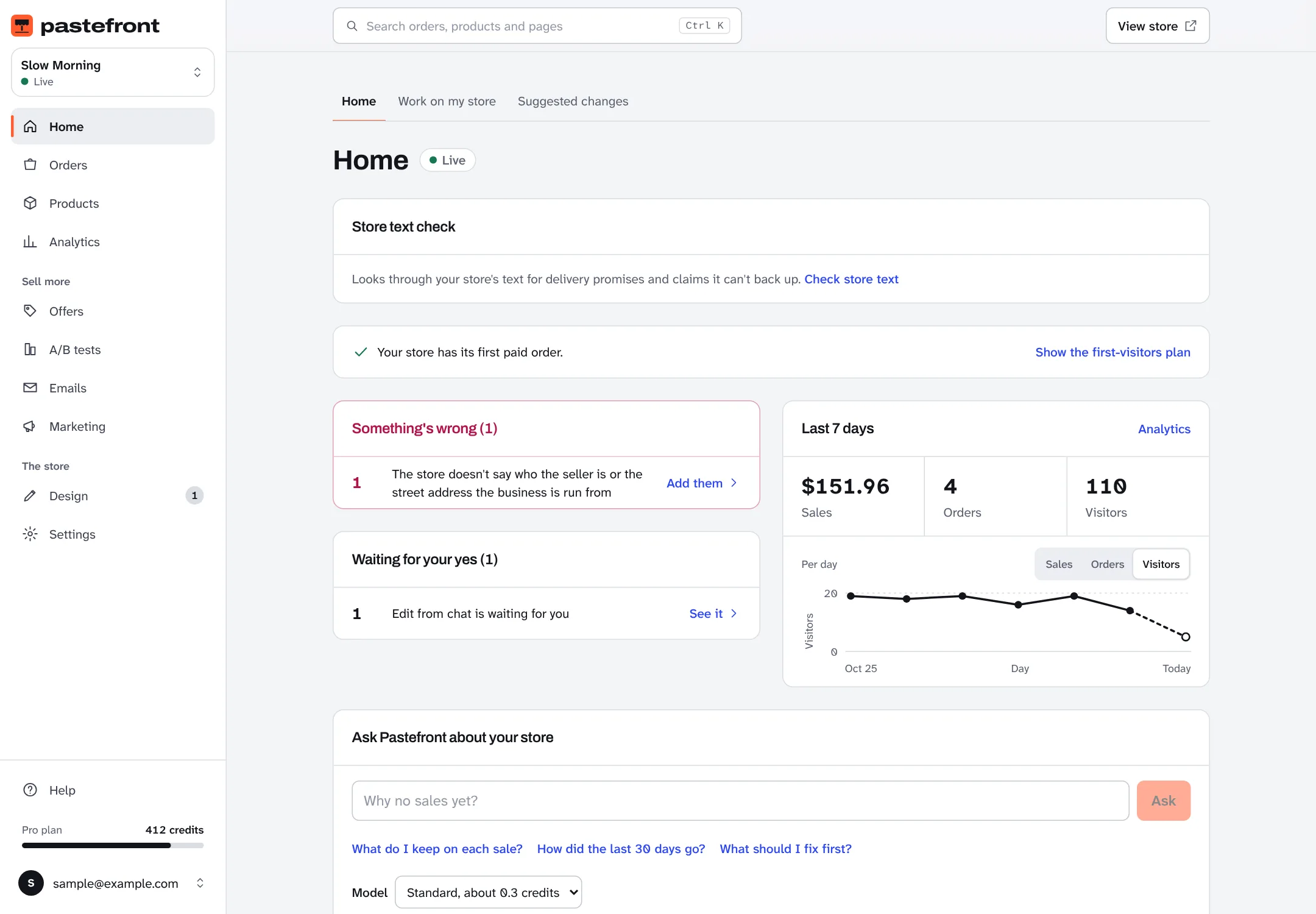
Each store opens on what needs you: what's wrong, what's waiting for your yes, the last seven days, and a box to ask about your numbers.
- Something's wrong: an order that needs you, or a supplier that ran out of an option or raised its cost.
- Waiting for your yes: chat edits ready to publish, and the changes Ask Pastefront and Work on my store suggest.
- The last 7 days against the week before, new product ideas with what you'd keep, and the latest orders.
Edit with chat
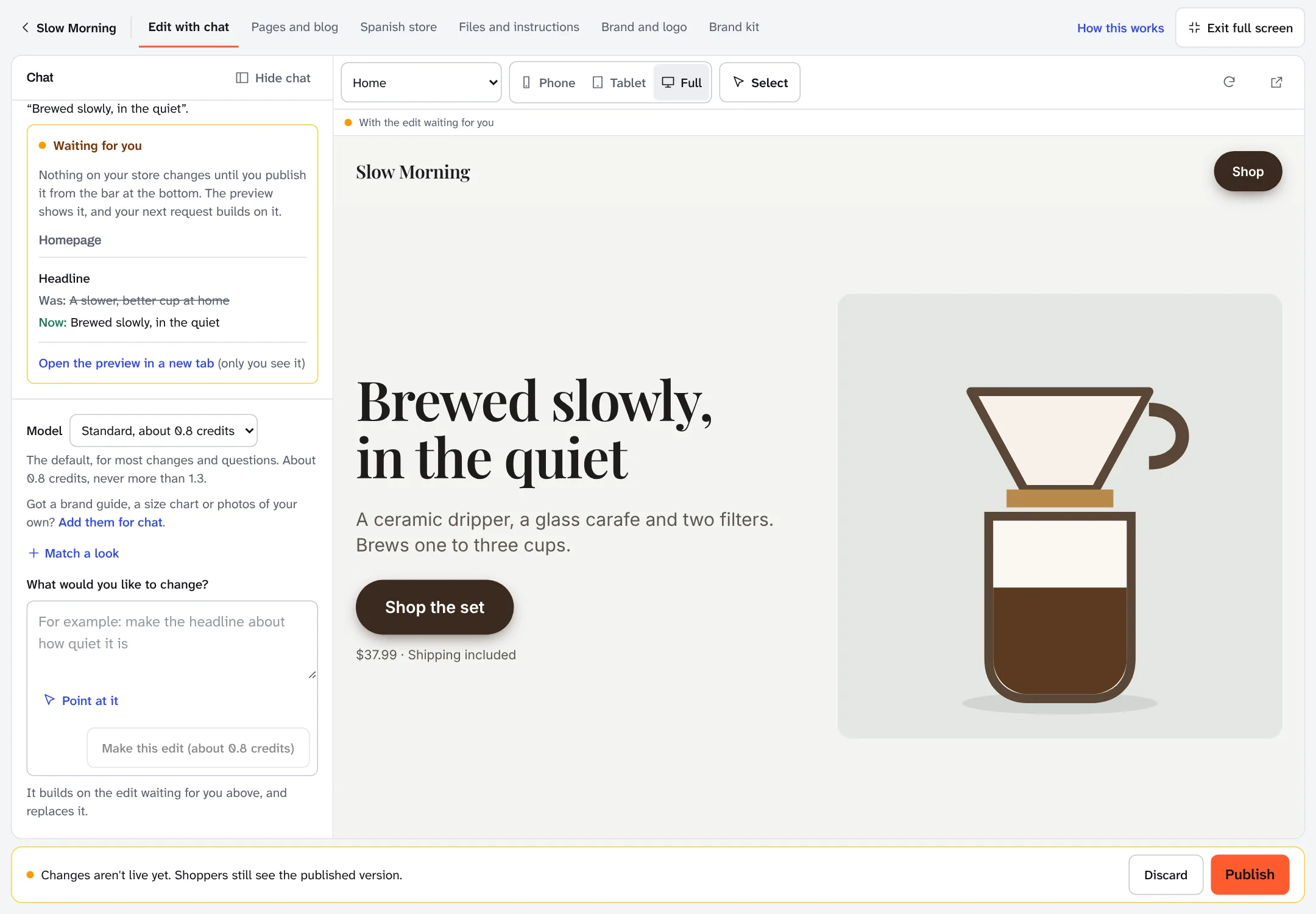
Ask for a change in plain words, point at the part you mean, and see it on the store before anyone else does.
- The chat on the left, the store as shoppers will see it on the right, at phone, tablet or laptop width.
- Nothing goes live until you press Publish. Earlier versions stay, so you can go back.
- Pick Lighter, Standard, Stronger or Strongest. You see about what an edit costs, and the most it can, before you send; a failed edit's credits come back.
- Give chat your files and saved instructions, point at a picture or a website to match its look, or ask for a new section or page.
- Chat notes: a running notes file that chat reads before every answer and adds to as you go, so a long chat keeps what you told it. Read, change or download it under Files and instructions.
- Ask for every product, or name the ones you mean, and one message changes each of their descriptions.
- When chat asks you something, it gives up to three choices with a short why, one recommended. Tap one to send it at the price shown, or type your own.
It keeps working while you're away.
Pastefront runs your store's back office around the clock: orders to the supplier, tracking, supplier price and stock checks, late-shipment rules. It asks before it changes anything buyers see, unless you've told it it may.
- Orders to the supplier
- Every half hour, paid CJ orders go to CJ, and new tracking numbers come back to the buyer's order page.
- Late orders
- Every half hour, each order that hasn't shipped is checked against the FTC's mail order rule. You're told when one needs a delay notice, or a refund and the date it's due by (7 working days), and told again if a refund is still owed. You send the notice, or on Pro and Scale let Pastefront send it for you: Go live asks which you want.
- Supplier price and stock
- Every Monday, Wednesday and Friday, each product's supplier is checked. An option that ran out, or that now costs more than its price covers, is held so no one can buy it at a loss, and you're told.
- Shipping quotes
- Every half hour, the supplier is asked again for any shipping quote to the US that's still missing, so you can see what an option really costs you.
- Work on my store, on a schedule
- Once you set one, a run starts every Monday morning on any paid plan, or every morning on Pro and Scale. It reads one part of your store at a time and leaves what it finds as cards for your yes. It stays within the step budget you set.
- A morning email
- On a morning when something on your stores is new, one email says what needs you. On a quiet day, nothing comes.
- Changes wait for your yes
- A price fix after a supplier cost went up, an A/B test's winner, a sale: each waits on Home as a card until you approve it. On Pro and Scale you can tick two exceptions under Without asking, each off until you tick it: the late-order notice, and a price raise of 20% or less back to your margin.
Ask for it in plain words.
Edit with chat, Ask Pastefront and Work on my store all wait for your yes.
- Change the store
- Words, colors, fonts and layouts, and new sections: a comparison, a spec table, steps, tips, an announcement bar or an Instagram band. Ask it to undo the last change, suggest store names, rename the store or set up a new price. Nothing goes live until you press Publish.
- Your first 5 chats
- Every account's first 5 chats in Edit with chat or Ask Pastefront are free, on Stronger, with your request filled out from your store's details first. A failed edit, or one that changes nothing (up to 3 times), gives its place back. A bigger ask, like a redesign, is priced as usual.
- Pick how much care
- Lighter, Standard, Stronger or Strongest. Each chat is priced by the AI time it uses, and you see about what it costs, and the most it can, before you send.
- Saver
- A lower-cost model for chat edits and ad copy, on paid plans, with the same checks: 10 free Saver edits per store in any 24 hours, and 1 credit for an ad set instead of 2.
- When Claude is busy
- If Claude is overloaded or down, a chat answers on a backup model through OpenRouter instead of failing, under the same rules and checks.
- Say it instead
- On paid plans, tap Speak in the chat box or Ask, say what you want, and tap Stop: a soft tone marks each, and the request is sent as you said it. Free, up to 2 minutes a request and 30 minutes a day per person; the recording isn't kept.
- Ask for a picture
- Chat doesn't redraw photos. A picture request changes nothing and links you to Edit with AI, with your words filled in.
- Give it your material
- Add a brand guide, product sheet, picture or notes for 1 credit each, and save up to 5 instructions that every chat follows, free. Chat says which file a fact came from, and never takes reviews or quotes from them.
- Match a look
- Point at a picture from your files or at a website. Chat picks the closest of Pastefront's layouts, fonts and colors, and copies no words, logos or photos.
- Pages and blog posts
- Gift guides, landing pages and blog posts from your own products, saved as drafts until you publish them. On paid plans.
- Sales, codes and tests from chat
- Ask for a weekend sale, a code or an A/B test, and it waits as a card on Home.
- Ask and Work on my store
- Ask a question and get an answer from your store's own numbers, or start a run that reads one part at a time. Every idea is a card you approve, on the website or the phone app. On every plan, Free included; each store's first run is free.
- Build out my store
- One ask adds 2 or 3 sections and FAQ answers from the listing, sets up a sale and a code as cards for your yes, and writes a gift guide as a draft. You see each step's estimate before you send.
- More in Build out my store
- The same ask now also rewrites every product page in the store's voice, adds size guides from the supplier's own size tables, an announcement line from a fact the store states, search descriptions, photo alt text and collections by use, and checks up to 3 prices against what similar products sell for, each price a card for your yes and never below your profit floor. It ends with up to 3 next steps, like opening the store as opening soon. "Redesign and build out my store" does both, one after the other.
- Extras after an edit
- After a chat edit to one product, chat can offer up to 3 of that product's paid extras as choices, such as pictures of it in use or a product that goes with it. Each opens the page that makes it, which shows the price again before it charges.
- Redesign my store
- One ask gives the store a new look and voice: style, colors, fonts, layout, logo and every section's words, with up to 3 products from your checked ideas and three new name ideas. You see the estimate before you send, and Publish puts it all live.
- Design details from chat
- Ask for outline buttons, sharp or round corners, framed or tinted photos, a new hero arrangement or floating shapes, or add a photo grid, a figures band, a brand statement or a moving words band. A redesign picks a fresh mix each time.
- Motion and frosted glass from chat
- Ask for calm, playful, magazine-style or crisp motion, a frosted-glass header and hero card with a soft moving light, or drifting droplets, rising bubbles or sparks. A redesign picks motion that suits the kind of store. Buyers who ask their phone for less motion see the page still, and the buy box never moves.
What a new store comes with.
Each store gets its own look, so two stores from the same supplier don't look alike.
8 page layouts: Split, Poster, Full photo, Spec sheet, Lookbook, Shop first, How-to and Showcase. Switch for free; it waits for Publish.
6 brand directions that set corners, buttons and headings, 32 font pairings, 35 palettes and a logo.
Make me a brand: 3 brands to pick from, each a name, logo and look. A store's first 3 are free; on a built store, Try a new brand waits for Publish.
A brand sheet in Brand kit with your logo, colors, fonts and voice on one page, free.
Up to 4 products that go with your first one, at the build, priced at or under what US stores charge and never below your profit floor.
A photo check at import: Claude puts the clearest photo first and flagged ones last, and writes alt text. Free.
New product ideas from CJ and AliExpress with the numbers you'd decide on: what it would sell for, what it costs you with shipping and duty, and what you'd keep. Find more ideas is free: once a day on a paid plan, once a week on Free.
Shop, About and Help pages on every store, drawn from what it already holds: its story, products, policies, contact address and FAQ. With 3 or more products, the range sits right under the hero.
Collections: once a store has 5 or more products shoppers can see, Claude groups them into 2 or 3 by use, each with a name and a one-line intro.
Options named in words. When a supplier only letters its options, the names come from the listing's description.
A bag, so a buyer can check out up to 5 products at once. Add to bag opens it as a drawer over the page, with one product that goes with it.
A free Store check after every Publish, or when you tap Check my store: other brands, copied supplier text, claims that need proof and contact details that shouldn't be there. Each finding has Fix in chat or Not a problem. It doesn't search trademark registrations, and finding nothing doesn't mean a store is legally clear.
Reviews from the supplier's own buyers, on for a new store until you switch them off, every one shown and labelled as the supplier's. An AliExpress listing shows AliExpress's own star rating instead, since AliExpress doesn't share written reviews.
A size guide with an inch and centimetre switch, copied from the supplier's own size table for free, or read from a size chart picture for 1 credit. Nothing is filled in.
"Tell me when it's back" on an option that's sold out: one email when the supplier has it again, and the buyer doesn't join your mailing list.
Pay over time at checkout with Affirm, Klarna or Afterpay, once you turn them on in your own Stripe account. Every profit floor counts their higher fee.
Product pages that show the name and price on a phone's first screen, specs in two groups and highlights with US units first, and the store's reasons to buy under "Why this one".
A home page whose first phone screen reaches the price and Buy now, in every layout.
Shipping and returns answered from the store's own facts: shipping to the US is included in the price, and the returns window is the one in its policy, with a link to each policy.
The supplier's delivery estimate on a product page, said as an estimate, never as a promised date.
Free shipping over an amount you set, from $10 to $1,000. It runs only while every option still clears your profit floor without its shipping, and pauses by itself when one doesn't.
A reviews strip on the home page with the newest reviews whatever their stars, your own buyers' first, then the supplier's, labelled as theirs.
A comparison of two to four of your own products, with their photos, prices and shared specs taken from the products themselves.
A share picture with the store's name and colors, so a pasted link shows the store rather than the supplier's photo.
Your store in Spanish too, on paid plans: the home page, product pages and chat's pages, kept up to date as you change them.
A store email address like slow-morning@mail.pastefront.com that forwards to your inbox.
Order and shipping emails to buyers.
Emails to your subscribers, sent when you press Send, on Pro and Scale.
A warning when your store name matches a live US trademark.
A morning email that lists what needs you across your stores, sent only on a day something is new. Switch it off on your Account page.
Pictures from your supplier's photos.
On paid plans. Every AI picture starts from a real supplier photo, keeps the product as it is, is marked as made with AI, and never leads your product page or stands in as an A/B test's version B. You compare each one with the photo before it goes on your store.
- Scene pictures
- Four pictures of your product in settings that fit your store, made from a supplier photo you pick, for 4 credits. Claude writes each prompt; the product stays as the supplier photographed it.
- In use, at its real size
- When the listing gives measurements, a fifth picture shows the product in use next to everyday things of known size, for 14 kinds of product. Clothing goes on a dress form unless you pick an adult AI model; kids' products never show a child.
- With a pet
- For a pet product, the fifth picture shows one calm animal of the kind it's made for, at its real size.
- Edit with AI
- Say what to change about a supplier photo, or tap one of 3 ideas Claude suggests for free. 1 credit an edit. Claude turns down changes to the product itself, and a turned-down request costs nothing.
- Clean up photos
- Up to 6 of a product's photos put on a plain white or store-colored square, for 2 credits. Only the background changes; you compare each pair, and the originals can go back.
- Store banner and mood picture
- A wide banner for the Full photo, Lookbook and How-to layouts, and a mood picture for your brand sheet, 1 credit each.
- Product and intro videos Coming when switched on
- A short product video and a 10-second store intro.
Test two versions.
Keep the one that sells.
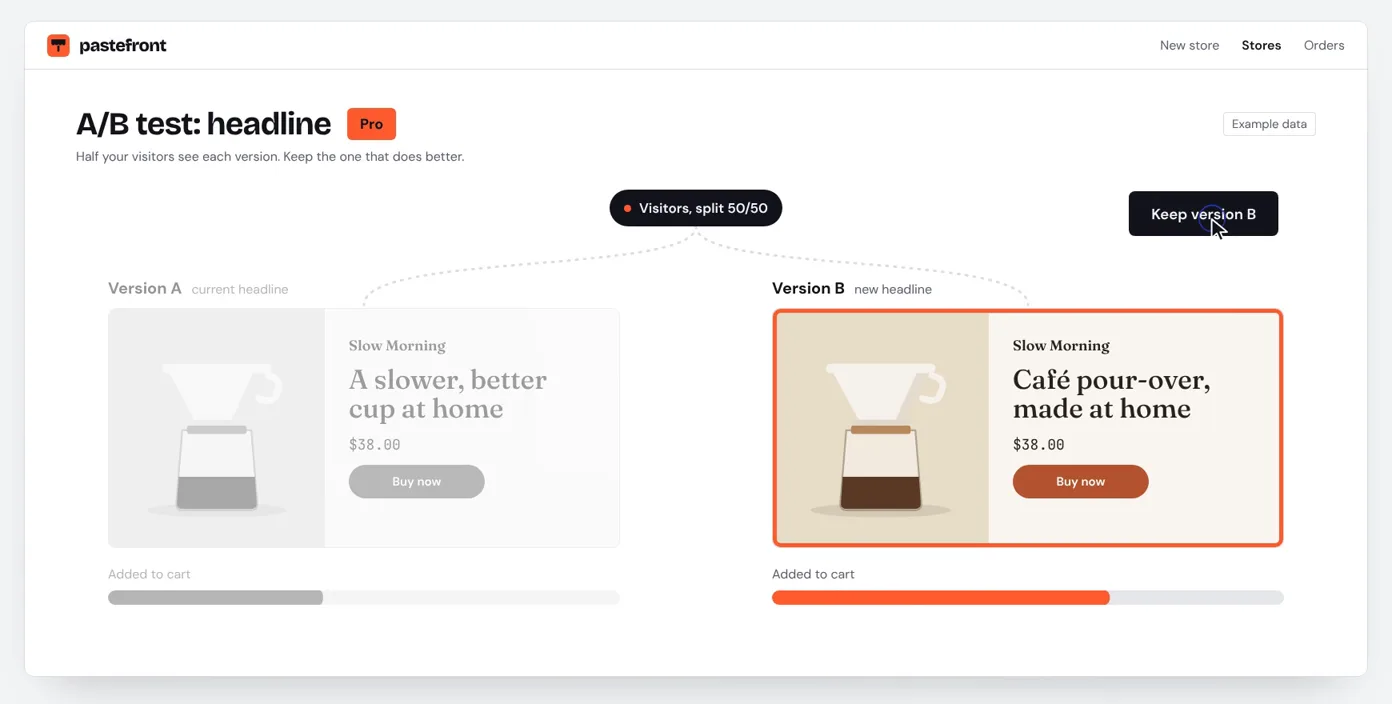
Split visitors between two headlines, main pictures, prices, page layouts or product descriptions. Claude suggests a test for each store and you start it.
- What you can test
- The home page headline, the main product picture, the price, the home page layout or the opening of the product description. One test per store at a time.
- Before your store opens
- A store that's opening soon can test everything but the price, counted on who signs up to hear when it opens. The page says sign-ups, not sales, and the test ends when the store opens.
- When it calls a winner
- Once it's 95% sure and has stayed that sure 3 days in a row, and not before the test has run 7 days, each version has had 200 visitors and the test 10 purchases. You decide whether to apply it.
- Price tests
- A test price stays within 15% of the regular price and above cost, and wins on profit per visitor, not on sales alone.
- How long
- Up to 30 days, or stop it whenever you like.
- Cost
- 3 credits a test, on Pro and Scale. Claude's suggestions are free. "Write 3 more versions" of a headline or opening paragraph is 1 credit.
Search and analytics.
Built into every store, with nothing to install. Where a store shows up in search still depends on the product and on who links to it.
More stores
Scale includes ten stores. Past that, extra stores are $12 a month each, with no credits, set on Plan and credits.
Search
Each store page gets its own search title, description and share picture, written from your product.
Store sitemaps, product markup and product feeds for Google Shopping and Meta catalogs, with your own search titles.
Analytics
Every order on your dashboard, with its status and tracking.
Visits, conversion rate, revenue and where buyers came from, by day.
A numbers sheet at Products > Numbers: each option's price, costs and what a sale keeps, with sales over 7, 30 or 90 days, prices you change after a review, and a CSV download.
18 connections
Tap one to see what Pastefront uses it for.
Try it with a real product link.
Your first build is free. If the product can't be sold, you find out before you spend a credit.